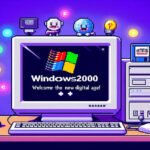
“When the year 2000 comes, everything will crash,” they said.
Microsoft replied, “I’m not going to crash the system — I’m going to upgrade the world.”
And on February 17, 2000, Windows 2000 took the stage. 🌍✨
⚙️ 1. The Birth of a Legend: The Child of Windows NT
Windows 2000 didn’t just appear out of nowhere.
Its ancestor, Windows NT 4.0, had a strong, professional foundation at the kernel level.
Microsoft wanted to bring that power to home users — so they softened NT’s corporate toughness and made it more user-friendly.In short:
The cuteness of Windows 98 + the muscle power of NT = Windows 2000 💪
This wasn’t just an “operating system.”
It was the prototype of future Windows architecture.
XP, 7, 10, 11… all come from this lineage.
🧠 2. NTFS 3.0: A Revolution in File Systems
At the heart of Windows 2000 was NTFS 3.0 (New Technology File System).
This was revolutionary for its time — the file system didn’t just store data anymore; it protected it.💡 Sweet Technical Facts:
- File permissions: Now you could define exactly who could access each file.
- Journaling: Even if the system crashed, the file system could pick up right where it left off.
- Disk quotas: Admins could finally say, “That’s enough space!” (No more endless MP3 folders from Ahmet 😎)
- Encryption (EFS): Files could now be encrypted at the system level for security.
If FAT32 was a can of soda, NTFS was a Red Bull + espresso shot combo. ☕⚡
🖥️ 3. Hardware Fell in Love: PnP, ACPI, USB 2.0
Windows 2000 sparked a full-on tech romance with hardware. 💞
✨ Plug and Play (PnP):
That magical “New hardware found” sound became pure joy.
No more mini heart attacks searching for driver CDs.🔌 ACPI Support:
For the first time, when you pressed the power button — the computer actually shut down properly!
Windows finally learned the meaning of “Turn off.”⚡ USB 2.0 Ready:
Though not yet mainstream, Windows 2000 laid the foundation for USB 2.0.
Mice, keyboards, scanners, printers — all were entering the plug-and-play paradise.
🌐 4. Network Architecture: When the Internet Got Serious
By the year 2000, the internet was evolving from a chat room into a corporate communication tool.
Windows 2000 became the engine behind that evolution. 🚀🧩 Active Directory:
Here comes the famous innovation!
Users no longer logged into computers, but into domains.
One user account now provided access to all network resources.
That “Wait, what was my password again?” panic finally began to fade.🌍 TCP/IP Stack Update:
Windows 2000 made TCP/IP more stable and reliable.
Pings became faster, connections smoother, and crashes rarer.🕸️ Internet Information Services (IIS 5.0):
Windows 2000 came with its own web server!
You could even host a mini website from home —
just be patient while your dial-up modem went “beeeep-biiip-biiiip.” 😅
🔒 5. Security: Everyone’s Locking the Door Now
Windows 2000 approached security not as decoration, but at the core level.
🔐 Kerberos Authentication:
This was a breakthrough in network security.
Passwords were no longer wandering the network naked.🧱 Local Security Policies:
Admins could finely control user actions.
“Can’t open the CD drive but can open Paint” — that era had arrived.💡 Pro Tip:
If you ever want to test Windows 2000 today (yes, it still runs on a virtual machine),
open “gpedit.msc” to explore some of these vintage policies. 😉
🔧 6. System Architecture: The Anatomy of Stability
The Windows 2000 kernel was NT Kernel 5.0.
It separated applications into user mode and kernel mode, greatly reducing crashes.🧩 The End of DLL Hell:
System files were protected through Windows File Protection.
If a program tried to replace “system32.dll,” Windows instantly restored the original.
Goodbye, chaos — hello, peace.🧠 Improved Memory Management:
Windows 2000 minimized memory leaks,
allowing servers to run for weeks without needing a reboot.
System admins rejoiced everywhere.
🎨 7. User Interface: Serious, Sleek, and Simple
Let’s admit it — Windows 2000 wasn’t exactly a visual spectacle.
But it didn’t need to be.
Its focus was professionalism: grey windows, minimalist icons, balanced colors.
Just like the suit-wearing system admins of the era — serious but classy. 😎💡 Fun Fact:
The “Bliss” wallpaper wasn’t from Windows 2000 — that came later with XP.
But that soft blue background… pure peace. 💙
🧩 8. Editions: Which One Would You Like, Sir?
Windows 2000 came in four editions:
Edition Target Users Key Features Professional Desktop users Stability, PnP, NTFS Server Small networks IIS, DHCP, DNS support Advanced Server Medium businesses Clustering, load balancing Datacenter Server Large enterprises Maximum uptime, 64 GB RAM 😱 A true family for every type of user. 👨💻
🧰 9. Practical Tips (From Then Till Now)
💡 1. Ctrl + Alt + Del
First time it launched the Secure Logon Screen.
Windows was now asking, “Are you really you?”💡 2. services.msc
Introduced to manage background services — still a system admin’s best friend today.💡 3. eventvwr.msc
The “Event Viewer” became much more advanced.
No more digging through logs like a detective with a magnifying glass.💡 4. regedit
Ah yes, the dangerous toy!
The registry system was far more stable —
but delete the wrong key and… good luck! (That was part of the adventure 😅)
🚀 10. Conclusion: Windows 2000 – The First Master of the Digital Era
Windows 2000 was more than an operating system.
It was the silent engineer who built the infrastructure of the future.
Modern Windows systems still stand on its foundation.Today, when we use cloud computing, virtualization, or domain management —
somewhere in the background, the spirit of Windows 2000 still hums quietly.“Every great revolution begins with a silent line of code.” 💙
Posted inThe Computer World
💾 Microsoft’s Windows 2000 Operating System: Stepping into the New Age of Computer Technology


Post navigation
Previous Post
 Jane Eyre – Bölüm 23 (Sadece İki Sayfa)